The real code is the prompt
The past few weeks have confirmed something I had been sensing for a while: the centre of gravity of my work has shifted. I no longer spend most of my time writing code. I spend it crafting prompts, refining contexts, configuring what will allow agents to produce what I need. Code has become an output. What matters is what generates it.
It is a subtle but profound shift. The acceleration of technology cycles plays a big part: tools become obsolete so fast that it no longer makes sense to invest heavily in mastering them technically. What remains stable, what survives the churn of tools, is the quality of the instructions you give agents. In other words: a good prompt outlives the tool that runs it.
Unlock the full article
Drop your email below and I’ll send you the rest right away.
The past few weeks have confirmed something I had been sensing for a while: the centre of gravity of my work has shifted. I no longer spend most of my time writing code. I spend it crafting prompts, refining contexts, configuring what will allow agents to produce what I need. Code has become an output. What matters is what generates it.
It is a subtle but profound shift. The acceleration of technology cycles plays a big part: tools become obsolete so fast that it no longer makes sense to invest heavily in mastering them technically. What remains stable, what survives the churn of tools, is the quality of the instructions you give agents. In other words: a good prompt outlives the tool that runs it.
Code is no longer the centre of gravity
For a long time, the value in a technical project lived in the code itself — in the quality of the architecture, the rigour of the tests, the choice of abstractions. That is no longer quite true, at least not in the same way.
What I observe in my day-to-day is that code is increasingly delegated. Agents produce it, fix it, refactor it. What I do is define the frame within which they operate. I describe the problem, set the constraints, specify what must not change. I manage context and instructions, not lines of code.
This is not a loss of control — it is a rise in abstraction. The prompt has become the interface between my intention and execution. And like any interface, its quality determines the quality of what comes out of it. A vague prompt produces vague code. A precise, well-contextualised prompt produces something usable, sometimes ready for production as-is.
What matters now is not knowing how to write code. It is knowing how to write what will generate it.
The problem of sprawl
Once you have internalised that, a new problem surfaces: proliferation. Because I do not use prompts only for development. I use them for writing, for meeting summaries, for organisation, for administrative tasks. Each area of activity has its own instructions, its own contexts, its own rules.
And every day that passes, I refine them. A word changed here, a constraint added there, a rephrasing that changes everything. It is a continuous, almost artisanal process. The problem is that with a dozen active projects running in parallel — application development, writing articles, management, monitoring — keeping all these prompts consistent quickly becomes unmanageable.
I found myself in an absurd situation: prompts of varying quality depending on the project, contradictory rules from one environment to another, improvements made in one project that never benefited the others. In short, exactly the same problem we try to avoid with code: duplication, divergence, no single source of truth.
I needed a method. And a method, in this context, looks like an architecture.
My three-level architecture
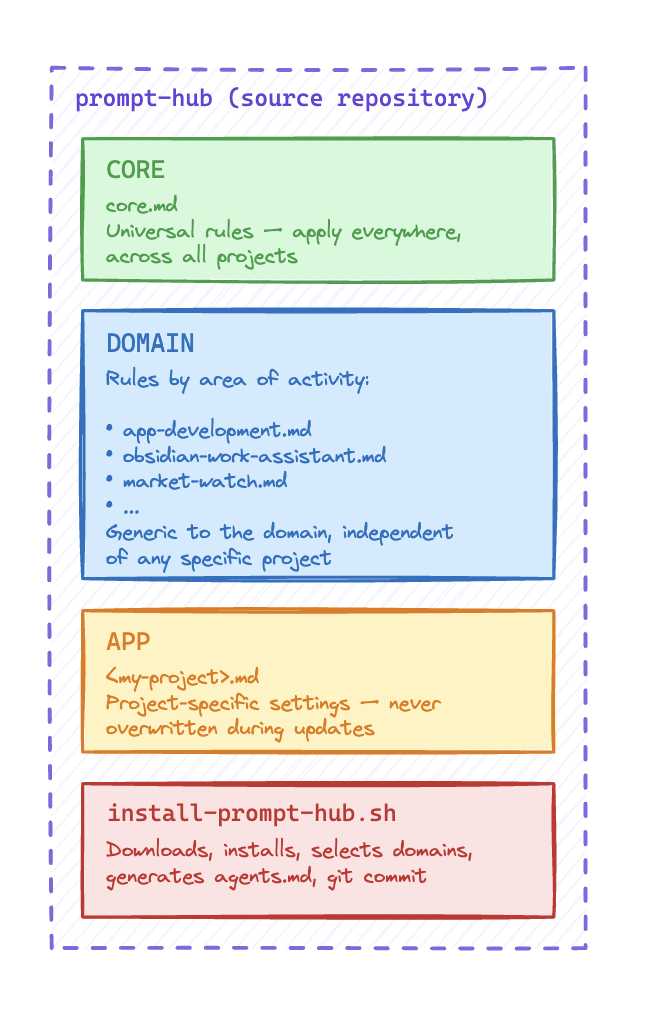
The logic I put in place rests on a simple principle: everything generic must be centralised, everything specific must remain configurable at the project level. Between the two sits an intermediate layer organised by domain of activity.
Concretely, I structured my prompts into three levels.
CORE — the universal foundation. These are the rules that apply everywhere, no matter what, regardless of the project or domain. Rigour, tone, expected response format, the baseline behaviours I want to find in every interaction with an agent. These prompts almost never change, and when they do, the improvement propagates everywhere automatically.
DOMAIN — rules by area of activity. This is the intermediate layer. I have a set of prompts for application development (do not introduce new technologies without asking, always update the documentation, test the produced code…), another for writing, another for organisation and management. These rules are generic to their domain — they apply to all my development projects, for example, but not to my editorial ones.
APP — the project layer, ultra-specific. This is where everything specific to a particular project lives: the business context, the specific technical constraints, the conventions of the team or client. This layer is entirely configurable and is never overwritten during updates.
What makes this system effective is the hierarchy: an agent operating on a project receives all three levels merged into a single instruction file. It knows the universal rules, the domain rules, and the project specifics. Nothing is missing, nothing conflicts.
Prompt Hub: the project I built for this
The three-level architecture is fine in theory. But without tooling, it stays manual — and manual is exactly what I wanted to avoid. So I built Prompt Hub, an open source project that automates the management and deployment of this architecture across my projects.
The principle is straightforward: Prompt Hub is a centralised prompt library paired with an installer that automatically generates a merged instruction file (agents.md and its equivalent CLAUDE.md) at the root of each project. That single file is what AI agents — Claude Code in particular — read as their operating policy at the start of each session.
Installation
Installation is a single command, run from the target project directory:
bash <(curl -fsSL https://raw.githubusercontent.com/blamouche/prompt-hub/main/install-prompt-hub.sh)Updating follows exactly the same logic — running the same command again is enough. Requirements are minimal: bash, curl, and tar.
What the installer does
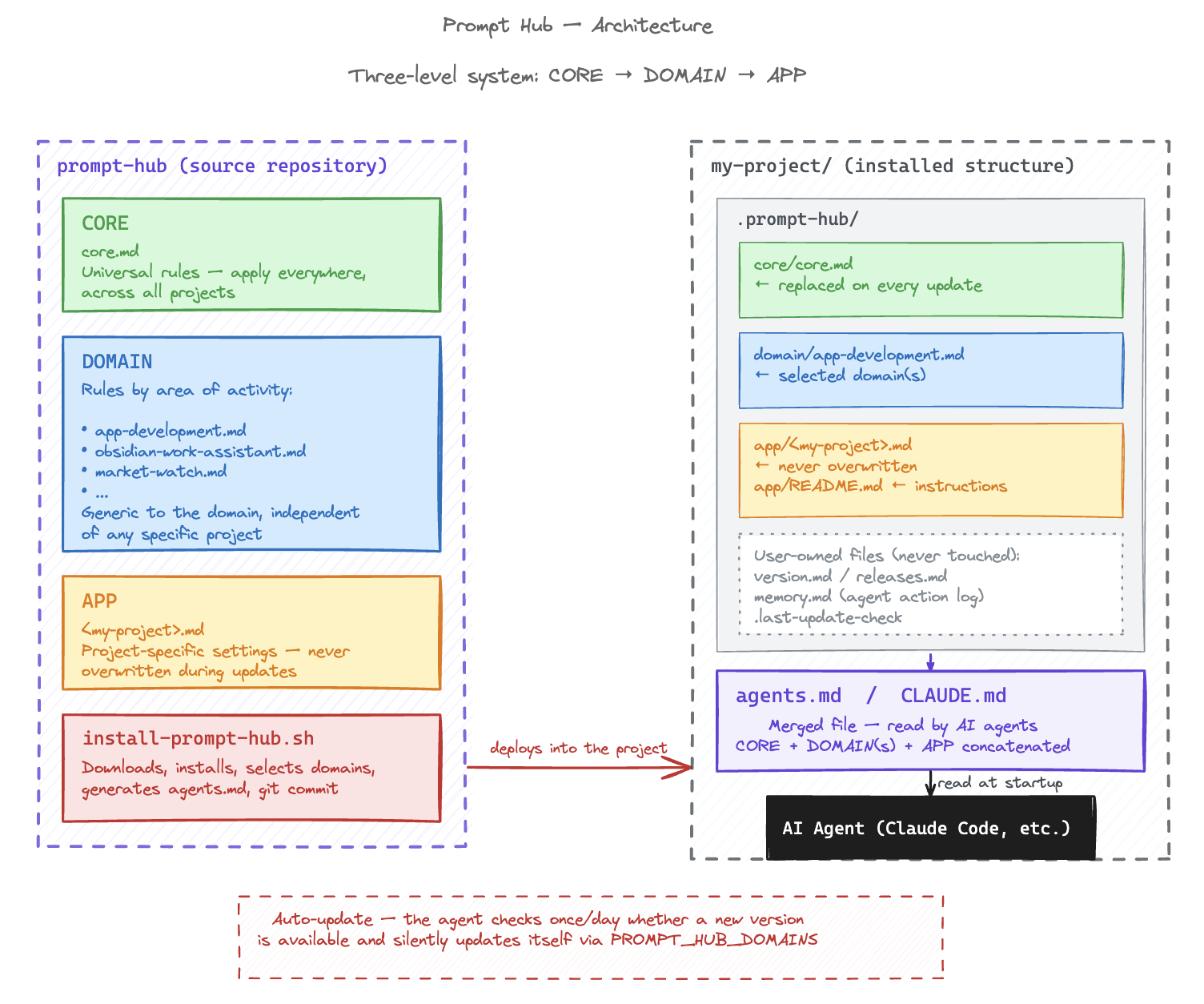
The installer downloads the prompt library from GitHub, creates a .prompt-hub/ directory in the project, and interactively guides the selection of domains to activate. It then generates agents.md by concatenating in order: the version notice, the APP layer files (project-specific prompts), the CORE, then the selected domain(s). If the project is a git repository, it automatically stages and commits everything.
The installed structure in each project looks like this:
.prompt-hub/
  core/
    core.md             ← universal foundation, replaced on every update
  domain/
    app-development.md  ← selected domain(s)
  app/
    README.md           ← instructions for custom prompts
    my-project.md       ← project-specific prompts, never overwritten
  prompt-hub-version.md ← installed version
agents.md               ← merged file, read by agents
CLAUDE.md               ← identical copy for Claude Code
Files that belong to me
One important point: everything living in .prompt-hub/app/ will never be touched by an update. These are my project-specific prompts — Prompt Hub preserves them systematically and merges them into the generated file on every run. Likewise, version.md, releases.md, and memory.md (the agent action log) are user-owned files, never overwritten.
Automatic updates
This is the part I find most elegant: the notice included in every CLAUDE.md contains instructions that Claude Code reads and executes automatically. Once a day, at session startup, the agent checks whether a new version of Prompt Hub is available. If so, it silently runs the update, preserving the already-installed domains, and notifies me of the change. As long as an agent is active in the project, Prompt Hub keeps itself up to date on its own.
What this changes in practice
Since this system has been in place, something has stabilised in the way I work. I no longer have to wonder whether the agent I am working with today has the same instructions as the one from yesterday, or from another project. Consistency is guaranteed by the structure, not by my memory.
The most concrete gain is the time I no longer spend reconfiguring. Before, every new project or environment meant tracking down the right prompts, copying and pasting them, adapting them, forgetting half of them. Now, one command is enough. The project immediately inherits all my rules, in their most up-to-date version.
The other change, less visible but just as real, is that I improve my prompts with much more peace of mind. When I refine a rule in the CORE, I know it will propagate everywhere at the next update cycle. I do not have to worry about consistency across projects — it is mechanical. That profoundly changes how I invest in the quality of my instructions: I know the effort will pay off across all my active projects, not just the one I am working on right now.
Managing prompts the way we used to manage code — with versioning, a single source of truth, a layered architecture — is perhaps the skill that is truly emerging in a world where agents handle most of the execution. Code can be delegated. Context and instructions cannot. They are what define what agents will produce, and therefore what gets delivered. They deserve the same care we once gave to software architecture.
The project is available as open source: github.com/blamouche/prompt-hub